
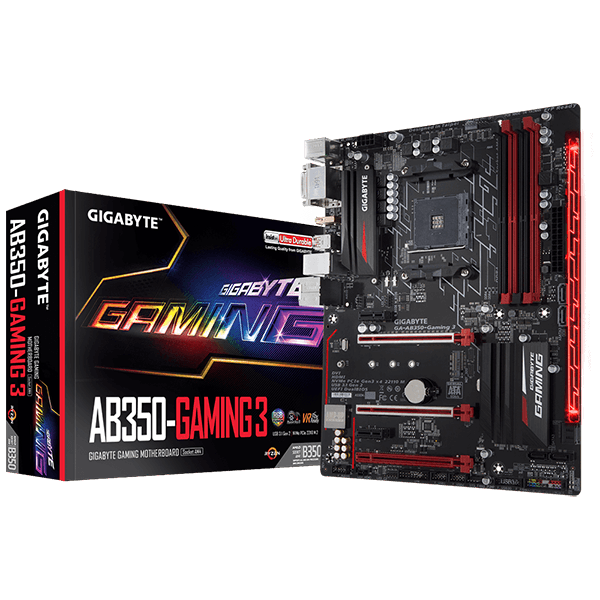

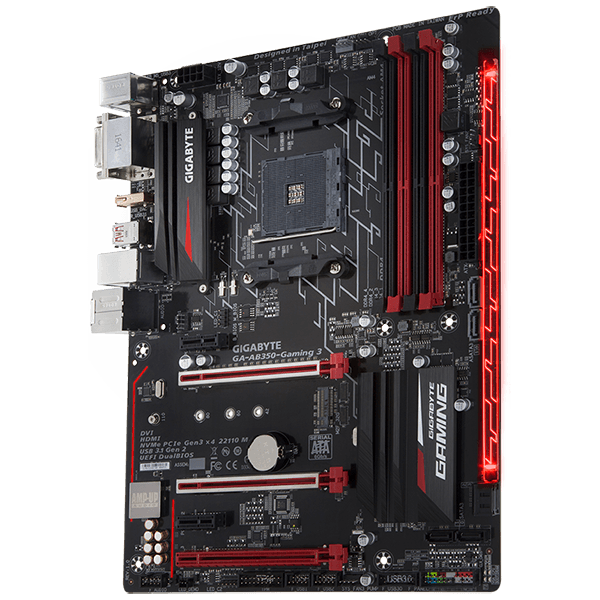

Description
GIGABYTE AB350-Gaming 3 motherboards boast the most advanced LED system in the market today. With more customizability than ever and a convenient and intuitive UI thanks to the RGB Fusion App, you’ll have a blast making your GIGABYTE your own. LED enthusiasts now have even more options with the ability to customize multiple zones independently. For a more functional use, the bright and vibrant LEDs can be configured to display the PC’s temperature or load. For even more LED goodness RGBW strips are now supported for more true and vibrant whites.
Multi-Zone Light Show Design
– 16.8M RGB Colors
– 2 Programmable Sections
– 7 Different Lighting Effects
– 2 RGB & RGBW Light Strip Pin Headers
– Accent LED with Interchangeable Overlay
– Advanced Mode for Extreme Customizability
GIGABYTE RGB Fusion APP
Don’t just make your PC shine, make it a work of art that friends will envy. With the GIGABYTE RGB Fusion mobile app users can watch as they control the lighting within their gaming PC. This gives users ease of access as they try and adjust colors and speeds for different modes, all this can be done away from the keyboard and monitor of their PC.
Surround Lighting
GIGABYTE AB350-Gaming 3 now offering more LED customizations than ever, users can truly adapt their PC to represent their lifestyle. With full RGB support and a redesigned RGB Fusion application, the user has complete control over the LEDs which surround the motherboard.
Swappable Overlay for Accent LED
GIGABYTE brings even more color and life to your system with an Accent LED Overlay. This overlay complements the RGB Fusion technology in GIGABYTE Motherboards adding more flare and style to your gaming machine. With the swappable overlay users can utilize different patterns and designs to make their system their own.
Supports RGBW & -UV Light Strips
Independently Programmable Onboard Pin Header for RGBW/-UV LED Strips
Not bright enough? You can install standard 12V external RGB, RGBW or RGB/UV light strips on the RGBW pin header and control its color from the RGB Fusion software. Using a RGBW light strip with a dedicated white LED, users will experience brighter and more vibrant shades of colors.
When using RGB/UV LED strips, users can give their systems a fluorescent glow with the use of UV reactive liquid, neon braided cables, and acrylic paint for a wicked-looking gaming PC.
No need to worry when choosing light strips as GIGABYTE motherboards support a wide variety of RGBW/-UV light strips on the market thanks to the RGB Fusion software that allows users to redefine the pin location for the R/G/B Signal.
RGB Fusion (Advanced mode)
With the all new RGB Fusion software, users have access to different preset LED lighting configurations with choice of colors. You can even set the LEDs to synchronize with your favorite music or have them change colors to indicate the CPU temperature.
For true lighting experts there is an Advanced Mode, which can be fully customized by individual area with its own effects and color transitions, along with specific duration and transition times.
Once done, it’s simple to save and share your lighting profile with others.
Smart Fan 5
GIGABYTE AB350-Gaming 3 with Smart Fan 5 users can ensure that their gaming PC can maintain its performance while staying cool. Smart Fan 5 allows users to interchange their fan headers to reflect different thermal sensors at different locations on the motherboard. Not only that, with Smart Fan 5 more hybrid fan headers that support both PWM and Voltage mode fans have been introduced to make the motherboard more liquid cooling friendly.
All Hybrid Fan Pin Headers
– All Hybrid Fan Headers can automatically detect the type of cooling device whether it be fan or pump with different PWM or Voltage mode.
– Supports up to 2 amps with built-in overcurrent protection—a must for high-end high current fans.
New Smart Fan 5 Software
Choose from different modes, Quiet to Full Speed, to match your system usage scenario. For each fan or pump, you can use the intuitive fan curve to define trigger thresholds and corresponding fan speeds.
Interoperable Sensors and Fans
Each fan can be customized to operate at different speeds according to any defined temperature source input (except the CPU fan).
Fan Curve
Customize fan curves based on specific temperatures with the intuitive graphical UI.
Enhanced BIOS Interface
The enhanced BIOS interface also has the advanced features seen in the Smart Fan 5 UI, such as: the ability to set triggers based on different temperature sensors on the board, fan curve definition and the temperature interval setting, which can prevent fan rotation noise caused by sudden temperature change—all without having to load Windows.
ALC 1220 120dB SNR HD Audio with Smart Headphone Amp
ALC 1220 120dB SNR HD Audio
The ALC1220 is a high-performance multi-channel High Definition Audio Codec with up to 120dB SNR for crystal clear audio and features such as Smart Headphone Amp, 114dB SNR recording for precise voice chats and hardware decoding of DSD128, ensuring users get the best possible audio quality from their PC.
Smart Headphone Amp
Automatically detects impedance of your head-worn audio device, whether earbuds or high-end headphones to provide optimal audio dynamics—preventing issues such as low volume and distortion.
High-End Audio Capacitors
GIGABYTE Gaming motherboards use high-end Chemicon audio capacitors. These high quality capacitors help deliver high resolution and high fidelity audio to provide the most realistic sound effects for gamers.
USB DAC-UP 2 Adjustable Voltage USB Port with Dedicated Power Design
GIGABYTE improves upon USB DAC-UP technologies with USB DAC-UP 2.
USB DAC-UP 2 continues to provide clean, isolated and low-noise power while adding the ability to compensate for voltage drop.
Virtual reality pioneers and gamers alike can rest assured that their expensive accessories and peripherals will not encounter connectivity or power deficiency issues with the GIGABYTE USB DAC-UP 2. With Gaming Gear drawing large amounts of power and having firm specification requirements USB DAC-UP 2 is up for the challenge.
Realtek® GbE LAN with cFosSpeed Internet Accelerator Networking
Realtek® GbE LAN features cFosSpeed, a network traffic management application which helps to improve network latency and maintain low ping times to deliver better responsiveness in crowded LAN environments.
Fast Onboard Storage with NVMe
PCIe Gen3 x4 110mm M.2 (Up to 32 Gb/s)
GIGABYTE’s M.2 solution offers considerably faster storage performance and support for both PCIe and SATA interfaces for M.2 SSD devices.
Fast USB 3.1 Gen 2 Solution
The latest USB 3.1 Gen 2 offers staggering 10Gb/s transfer speeds. 2x faster than USB 3.1 Gen 1 along with backwards compatibility with existing USB devices.
Diagnostic LEDs
Hardware Troubleshooting at a Glance
Onboard LEDs controlled by the system BIOS indicate if a malfunction is occurring, allowing users to quickly diagnose which major component (CPU/DDR/VGA/HDD) is malfunctioning so they may take action promptly.
Anti-Sulfur Resistor Design
Sulfur compounds in the air can penetrate tiny onboard resistors creating chemical change and causing these resistors to open or short. If either of these occurs the motherboard will fail to function. By equipping resistors with an Anti-Sulfur Design GIGABYTE gives Ultra Durable Motherboards a whole new meaning.
Refreshed BIOS Easy, Smart, and Friendly
The BIOS is essential for users during initial setup to allow for the most optimal settings. With a new GUI and easier to use functionalities, GIGABYTE has been able to reinvent the BIOS to give users a better experience while setting up their new system.
GIGABYTE APP Center
The GIGABYTE APP Center gives you easy access to a wealth of GIGABYTE apps that help you get the most from your GIGABYTE motherboard. Using a simple, unified user interface, GIGABYTE APP Center allows you to easily launch all GIGABYTE apps installed on your system, check related updates online, and download the latest apps, drivers, and BIOS.
EasyTune™
GIGABYTE’s EasyTune™ is a simple and easy-to-use interface that allows users to fine-tune their system settings or adjust system and memory clocks and voltages in a Windows environment. With Smart Quick Boost, one click is all it takes to automatically overclock your system, giving an added performance boost when you need it the most.
System Information Viewer
GIGABYTE System Information Viewer is a central location that gives you access to your current system status. Monitor components such as the clocks and processor, set your preferred fan speed profile, create alerts when temperatures get too high or record your system’s behavior; these are the possibilities of the System Information Viewer.
@BIOS
The GIGABYTE @BIOS app allows you to update your system’s BIOS from within Windows using a simple and slick graphical user interface. @BIOS can automatically download the latest version from the GIGABYTE servers or you can update your BIOS from a file on your computer. @BIOS also allows you to save your current BIOS to a file, recover your previous BIOS from an image and backup your BIOS to an image.
3D OSD
3D OSD automatically detects and displays your system information during games, allowing you to easily get a hold of your system information without switching between screens.
GIGABYTE Patented DualBIOS™ (UEFI) Design
GIGABYTE Ultra Durable™ motherboards feature GIGABYTE DualBIOS™, an exclusive technology from GIGABYTE that protects arguably one of your PC’s most crucial components, the BIOS. GIGABYTE DualBIOS™ means that your motherboard has both a ‘Main BIOS’ and a ‘Backup BIOS’, protecting users from BIOS failure due to virus, hardware malfunction, improper OC settings or power failure during the update process.
Easy to Install “G-Connector” Design
The tiny cables of the front panel connectors can be hard to manipulate as space is restricted and indicators being tiny. With the G-Connector, you can connect all the FP cables at once, simplifying the process of building your next PC and saving you some frustrations.
4K Ultra HD Support
4K resolution is the next technological milestone in high-definition content delivery, utilizing approximately 4,000 pixels on the horizontal axis, more than four times today’s standard HD pixel density. GIGABYTE motherboards provide native 4K support with integrated AMD Radeon® Graphics via HDMI.
HDMI™ – The Next Generation Multimedia Interface
HDMI™ is a High-Definition Multimedia Interface which provides up to 5Gb/s video transmitting bandwidth and 8-channel high quality audio all through a single cable. Able to transmit superior, uncompressed digital video and audio, HDMI™ ensures the crispest rendering of digital content up to 1080p without the quality losses associated with analog interfaces and their digital-to-analog conversion. In addition, HDMI™ is compatible with HDCP (High-bandwidth Digital Content Protection), allowing the playback of Blu-ray/HD DVD and other protected media content.
XSplit Gamecaster + Broadcaster: Cast Your Game Anytime, Anywhere
Now set up your stage and share the greatest gaming moments with XSplit Gamecaster + Broadcaster! Fully optimized social media integration is ready for real-time chats—keeping you notified yet focused in the game. It takes just one click to stream your gameplay to Twitch. Host your game like a pro!
TriDef® SmartCam | Custom Stream Modding
To facilitate being the full streaming solution each GIGABYTE motherboard includes TriDef® SmartCam software, you are now able to remove backgrounds without the hassle of using a green screen. Through the SmartCam application you can now apply live filters, and fully control your background, not only while streaming, but also through other video applications such as Skype.
Link to GIGABYTE Product Page:
https://www.gigabyte.com/us/Motherboard/GA-AB350-Gaming-3-rev-1x#kf


Reviews
There are no reviews yet.